
你的网站突然打不开,浏览器提示“证书已过期”。你明明记得Let’s Encrypt会自动续期。为什么没成功?
自动续期不是魔法,它有失败的可能。端口被占、防火墙挡了、域名解析错了、服务器时间不对——都会让续期失败。
今天把常见的续期错误和修复方法列清楚。
先看一个数据
某云厂商统计,超过30%的Let’s Encrypt证书续期失败,原因是80端口不通或防火墙拦截。证书续期需要验证域名所有权,Let’s Encrypt会通过80端口访问你服务器上的临时文件。端口不通,验证失败,证书不续。
自动续期失败后,你不会收到通知。直到证书过期那天,用户看到警告页面,你才知道。
续期失败的第一步:手动跑一次
Certbot自动续期没触发,先手动跑一次,看具体报错。
bash
sudo certbot renew --dry-run
--dry-run是测试模式,不会真的续期,只检查流程是否正常。如果成功,说明配置没问题,只是定时任务没跑。如果失败,会输出具体错误信息。
测试通过后,手动执行一次真实续期:
bash
sudo certbot renew
只会续期30天内到期的证书。想强制续期所有证书:
bash
sudo certbot renew --force-renewal
看到Congratulations,续期成功。看到红色报错,看下面的常见错误对照表。
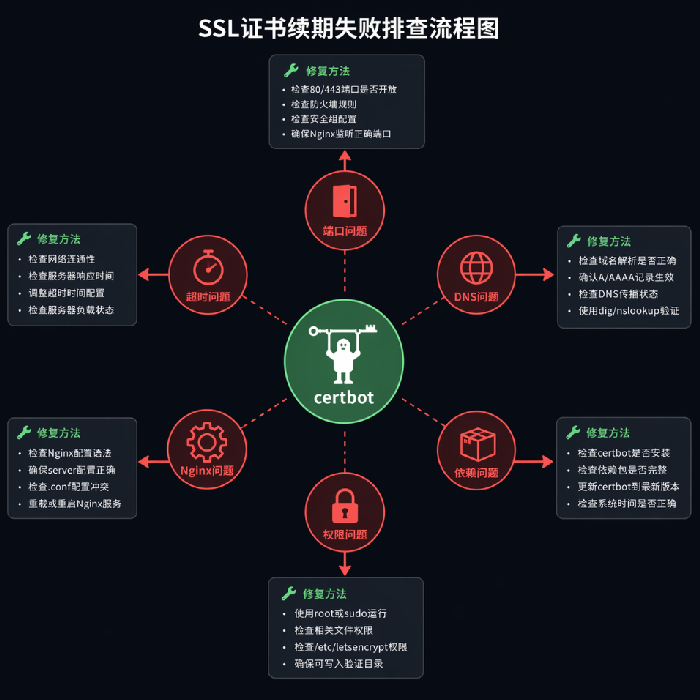
错误一:连接超时(Connection timed out)
报错示例:
text
Attempting to renew cert from /etc/letsencrypt/renewal/example.conf produced an unexpected error:
"HTTPSConnectionPool(host='acme-v02.api.letsencrypt.org', port=443):
Read timed out.".
原因:服务器无法连接Let’s Encrypt API。可能是防火墙、安全组、或网络问题。
修复:
- 检查出站规则:服务器能不能访问外网?
curl https://google.com测试。 - 检查防火墙:
iptables -L看有没有阻止443出站。 - 检查云厂商安全组的出方向规则,是否允许访问外网443端口。
错误二:80端口无法访问(Connection refused)
报错示例:
text
Failed authorization procedure. example.com (http-01): urn:ietf:params:acme:error:connection ::
The server could not connect to the client to verify the domain
原因:Let’s Encrypt无法通过80端口访问你的服务器。Nginx没监听80,或者防火墙/安全组拦截了80端口。
修复:
- 确认Nginx在监听80端口:
netstat -tulnp | grep :80 - 检查云厂商安全组的入方向规则,80端口是否开放
- 检查服务器防火墙:
iptables -L -n看80端口是否被DROP - 测试外网能否访问80:
curl http://你的域名(从外网测试)
反常识点:即使你的网站只使用HTTPS,证书续期仍然需要80端口。Let’s Encrypt的HTTP-01验证方式默认走80。如果确实无法开放80,考虑改用DNS-01验证(通过DNS记录验证,不需要开放端口)。
错误三:DNS解析错误(DNS problem)
报错示例:
text
DNS problem: NXDOMAIN looking up A for example.com
原因:Let’s Encrypt解析不到你的域名。域名没配置解析,或者刚改了解析还没生效。
修复:
- 检查域名解析:
dig example.com看是否返回正确IP - 确认域名已经指向服务器IP
- 如果刚改了解析,等几分钟再试
错误四:Python依赖问题
报错示例:
text
ImportError: No module named cryptography
原因:Certbot依赖的Python包版本太旧或损坏。
修复:
bash
# 升级certbot和相关包
sudo apt update
sudo apt install --only-upgrade certbot python3-certbot-nginx
或重新安装:
bash
sudo apt remove certbot
sudo apt install certbot python3-certbot-nginx
错误五:权限问题(Permission denied)
报错示例:
text
Permission denied: '/etc/letsencrypt/live/example.com/privkey.pem'
原因:Certbot没有权限写入证书目录。
修复:
bash
sudo chown -R root:root /etc/letsencrypt
sudo chmod -R 755 /etc/letsencrypt
错误六:Nginx配置问题导致验证失败
报错示例:
text
The server experienced an internal error :: Error creating new order
有时不是网络问题,是Nginx配置把验证路径劫持了。
修复:在Nginx配置里,确保/.well-known/acme-challenge/路径不被重定向或拦截。
nginx
location ^~ /.well-known/acme-challenge/ {
    allow all;
    root /var/www/html;
}
放在server块最前面。
续期后Nginx没有重载
证书文件更新了,Nginx还在用旧证书(内存里的)。Nginx需要重载才能加载新证书。
检查续期后是否自动重载:
bash
# 查看certbot的post-hook配置
cat /etc/letsencrypt/renewal/example.com.conf | grep renew_hook
如果没有,手动加一个:
bash
sudo certbot renew --renew-hook "systemctl reload nginx"
或在配置文件里加:
ini
renew_hook = systemctl reload nginx
真实案例
一个朋友的博客,证书过期了一周他都不知道。检查发现,他的Certbot版本太老,自动续期功能有bug。升级Certbot后,手动续期成功。他在crontab里加了一条每日检查:
text
0 2 * * * /usr/bin/certbot renew --quiet && systemctl reload nginx
加了一行日志,每天记录续期状态。再也没出现过期问题。
预防措施
- 监控证书有效期:用Uptime Kuma或Prometheus加告警,提前30天通知
- 每天跑续期:crontab里加
certbot renew --quiet,安全(没到期的不会续) - 定期手动测试:每月跑一次
certbot renew --dry-run,确保流程正常 - 保留续期日志:
certbot renew --quiet >> /var/log/certbot.log 2>&1,出问题能回溯
最后一句
证书续期失败,通常不是大问题。80端口不通、防火墙拦截、DNS解析错了。一样样排查。
先手动跑certbot renew --dry-run,看报错。对照上面的错误类型,找到你的那个。修好之后,再跑一次certbot renew。
把监控加上。证书到期前30天,让告警找你。别等用户告诉你。
证书是网站的门锁。门锁坏了,用户进不来。你不想站门口等开锁。